
Studio Monitors vs Headphones for Mixing- Pros and Cons

June 19, 2025

By RocketPages

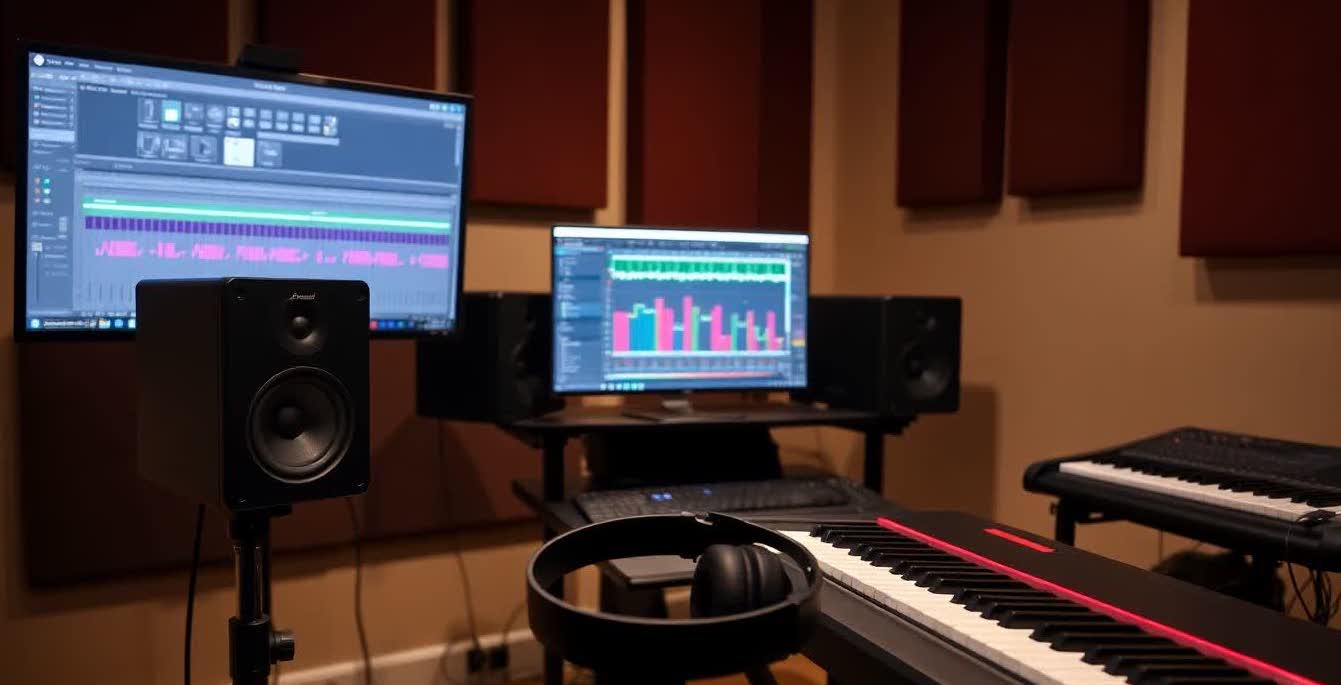
Home studio with studio monitors and open-back headphones next to a digital audio workstation.

When it comes to mixing music, few decisions are more important than your choice of monitoring gear. Whether you’re crafting an ambient lo-fi track or polishing a high-energy EDM drop, your ears are your most valuable tool. But should you trust studio monitors or headphones?


The debate is ongoing—and for good reason. Each offers unique advantages and limitations, and both play critical roles in how you perceive, shape, and finalize your sound.


If you’re producing from a home studio, bedroom, or on the road, understanding how each system affects your mix can mean the difference between a muddy track and a professional-sounding release.


Studio Monitors: What They Offer and Why They Matter


Studio monitors are purpose-built speakers designed for critical listening. Unlike consumer-grade speakers that boost bass or add sparkle to the highs, studio monitors aim for a neutral, flat frequency response. This neutrality allows you to hear your music exactly as it is—without sonic enhancements.


Pros of Using Studio Monitors:

  • Flat Frequency Response = Honest Mix Decisions
  • You're hearing your track without artificial boosts. This helps ensure your decisions about EQ, dynamics, and panning translate well across devices.
  • Accurate Stereo Imaging
  • Monitors let you perceive depth, width, and placement in the stereo field as it naturally occurs in a room—essential for creating a wide, spacious mix.
  • Physical Impact of Low Frequencies
  • You feel sub-bass and kick drums in your chest, not just your ears. This is key for genres like hip-hop, trap, techno, and bass music.
  • Natural Room Translation
  • Because monitors interact with the environment, you hear music the way your audience might experience it through real-world playback systems.


Cons of Studio Monitors:

  • Room Dependency
  • Without acoustic treatment (bass traps, diffusers, panels), even expensive monitors can sound inaccurate due to reflections and standing waves.
  • High Initial Cost
  • A proper setup—monitors, stands, acoustic treatment, and an audio interface—can quickly exceed $1,000 for a basic pro-level rig.
  • Lack of Portability
  • Studio monitors require space and a stable environment. They're not suitable for mobile producers or night-owl sessions in shared living spaces.


Want to improve your studio environment? How to Build a Home Photography Studio – also applies to lighting and acoustics in music rooms.


Headphones: The Secret Weapon for Precision Mixing


While studio monitors emulate a room-based listening experience, studio headphones offer a close-up, isolated way to hear your mix. They're especially helpful for detailed work, late-night sessions, and referencing your mix without external room interference.


Pros of Mixing with Headphones:

  • No Room Acoustics to Worry About
  • What you hear is consistent regardless of your surroundings—perfect for untreated rooms or travel setups.
  • Reveals Hidden Details
  • Headphones can expose subtle clicks, pops, reverb tails, distortion, and edit flaws that you might miss on speakers.
  • More Budget-Friendly
  • You can get excellent open-back headphones for a fraction of the price of high-end monitors and room treatment.
  • Silent Workflow
  • No noise pollution means more flexibility when working in shared spaces or late at night.

Cons of Mixing with Headphones:

  • Unnatural Stereo Image
  • Sounds appear “inside your head,” lacking the sense of space and air you get from speakers in a room.
  • Coloration Still Exists
  • Even professional headphones aren’t perfectly flat. Some emphasize lows or highs, which can lead to inaccurate decisions if you’re not familiar with your gear.
  • Can Cause Ear Fatigue
  • Extended listening on headphones—especially at higher volumes—can be tiring or even damaging to your ears over time.


Related reading: How to Build a Music Reference Library for Creative Projects.


Studio Monitors vs. Headphones: Which One Should You Use?


If you're aiming for a professional-quality mix, the ideal solution is to use both—strategically.


Each tool offers a different perspective. Monitors reveal how your mix interacts with space and translates in the real world. Headphones allow for precision editing and critical listening in noisy or untreated environments.


Ideal Hybrid Workflow for Mixing:

  • Start with Studio Monitors
  • Craft the general balance, stereo image, and feel of the track. Get the mix sounding good in a room environment first.
  • Switch to Headphones
  • Zoom in on details—clean up transient clicks, check vocal sibilance, fix panning errors, and analyze stereo width without room reflections.
  • Reference Across Devices
  • Play the mix on a smartphone, laptop speakers, car stereo, or earbuds to ensure it translates well for real-world listeners.


Related reading: How to Choose a Music Discovery Newsletter.


Pro Tips for Optimizing Your Monitoring Setup


Here’s how to get the most accurate and effective listening environment—no matter your gear:


  • Use Open-Back Headphones for Mixing
  • Open-back designs provide better stereo accuracy and more natural frequency response, making them ideal for critical listening.
  • Use Closed-Back Headphones for Recording
  • They prevent audio bleed during live tracking, especially vocals and acoustic instruments.
  • Consider Headphone Calibration Software
  • Tools like Sonarworks SoundID or Waves NX flatten the frequency response of your headphones for more neutral mixing.
  • Treat Your Space If You’re Using Monitors
  • Even simple improvements like acoustic foam, bass traps, and speaker stands can drastically improve your mixing accuracy.


Need help building a production-friendly workspace? How to Use Contrast in Photography – visual principles also apply to acoustics and lighting in home studios.

Related reading: How to Evaluate AI Music Tools for a Creative Workflow.


Final Thoughts


There’s no one-size-fits-all answer when it comes to mixing on studio monitors vs. headphones—each brings its own flavor to your workflow.


  • Studio Monitors offer real-world spatial realism, vital for balancing and stereo imaging.
  • Headphones offer surgical detail and portability, making them indispensable for editing and referencing.


For serious producers and engineers, the smartest approach is to use both. Switch between them frequently, and your mixes will become more balanced, accurate, and listener-friendly across all platforms.


Related reading: How to Prepare for a Music Production Consultation.

Compare a mix using a repeatable listening task

Choose a short section and one question, such as whether the vocal remains clear or a transition changes level unexpectedly. Listen on your available setup at a comfortable level and record the observation. Keep the playback conditions as consistent as practical when comparing versions.

Check the mix on another suitable playback system when available. Note differences without immediately changing every control. A difference may point to something worth investigating, but it does not identify the cause by itself. Return to the session and make a focused comparison.

Keep a reference export and label each revision clearly. Listen outside the recording application as part of the review. Choose monitoring equipment around your workspace, requirements, and current manufacturer information, while remembering that learning a setup through repeated, careful comparisons is part of making useful decisions with it.

Recent Articles

Stay up to date with the newest tips, gear reviews, and step-by-step guides to elevate your photography journey from home and beyond.

How to Set Up SEO in RocketPages for Search and AI Discovery
To prepare a RocketPages website for search and AI discovery, give each page a clear name and description, publish useful content on your chosen domain, check the sitemap and crawl access, and monitor...
Read More
Illustration of a website connected to a custom domain with SSL security
How to Connect a Custom Domain to RocketPages
You can connect a domain you own to RocketPages by adding it in your site settings, updating its DNS records, validating the connection, and choosing a primary domain. Custom-domain connection is avai...
Read More
Illustration of a small-business website connected to a custom domain with SSL security
RocketPages Free Plan: What’s Included and How to Use Your Own Domain
Yes. RocketPages lets you build and host a website on its free plan and connect a custom domain. You can create unlimited pages and invite unlimited team members, subject to the plan’s storage, bandwi...
Read More